
Part 2 of our series on improving CAE productivity with agentic AI tools
In Part 1, we looked at the productivity paradox: in METR’s early-2025 randomized trial, experienced developers took 19% longer with AI tools, yet believed AI had sped them up by 20%. Here we show how an agentic AI framework mitigates the causes, using Cursor to build the framework and solve an Abaqus cantilever beam on an HPC cluster.
A Quick Refresher: The Five AI Pitfalls
- Invented APIs and keywords. LLMs hallucinate commands. Give the LLM the relevant documentation and a way to check its keywords and correct itself.
- Execution success is not design intent. The agent can feel like it succeeded but still have the wrong loads or geometry. Have it explain back any implicit decisions, and give it ways to check the results.
- Inconsistent results. Vague prompts can give you a different geometry, load, or mesh on every run. Define the parameters clearly, constrain the model, and save them in a specifications file.
- LLMs don’t learn. They don’t remember their mistakes. Save lessons learned, fix history, and errors so the LLM can remember what it figured out before.
- LLMs can do bad things. They can do crazy things, like delete all your data. Review every command before it runs.
A Good Paper on a CAE Mitigations Framework
A paper by Eun Hyun Kim and Jae Hyuk Lim of the Department of Mechanical Engineering at Kyung Hee University introduces a concept to reduce these issues. Its title translates to “A Study on the Development of an LLM-Based Abaqus MCP-Integrated Finite Element Analysis Automation System, with Hallucination Suppression and Performance Improvement.” It describes an LLM based Abaqus automation system with hallucination suppression built in.
The paper is written in Korean, but you can use an LLM to translate it into your own language. Better still, we can use the paper to have Cursor create the framework for us.
The Autonomous Workflow from the Paper
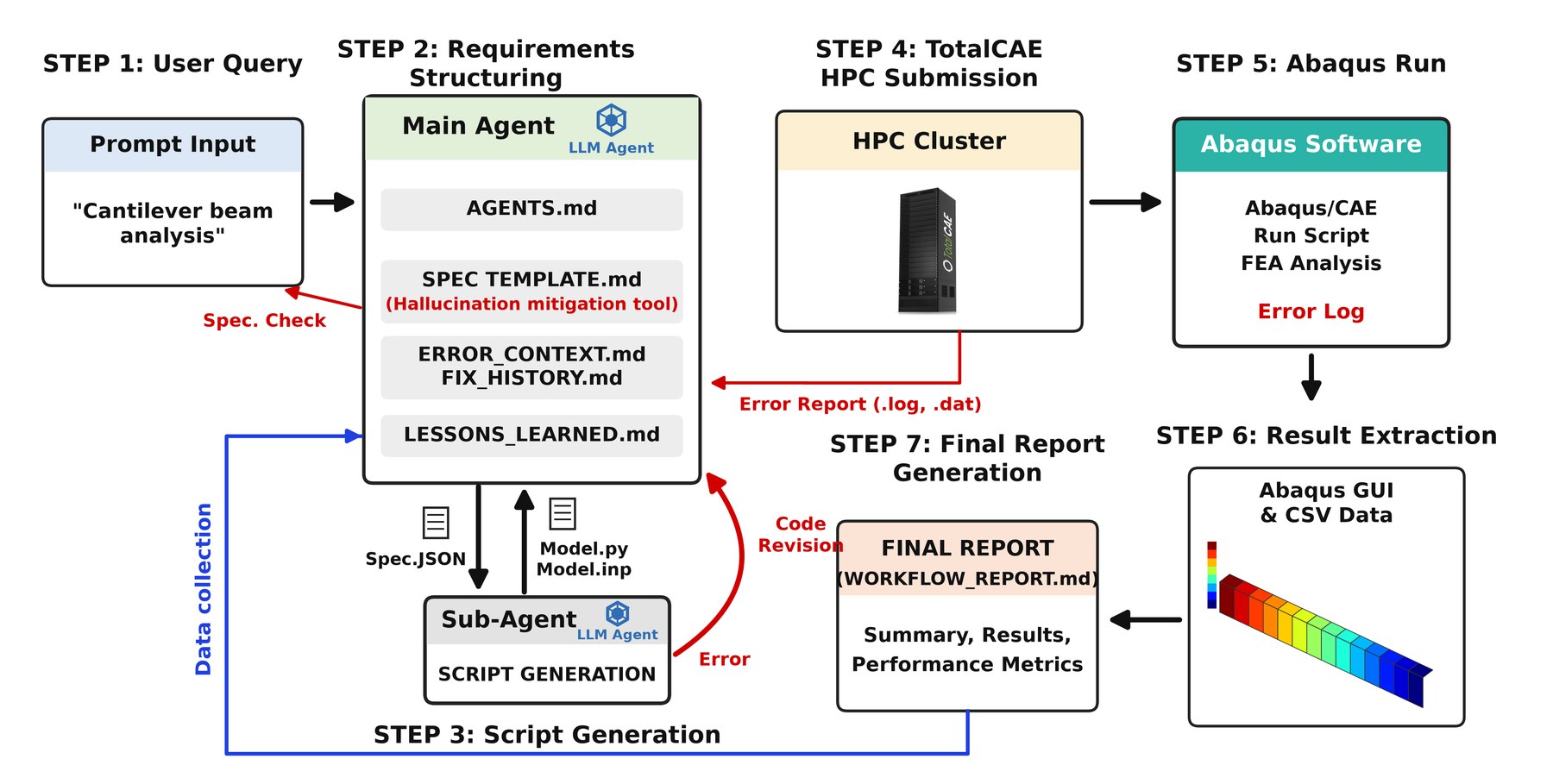
The workflow starts with a user query, in our case a cantilever beam analysis. A main agent structures the requirements, and a sub agent generates the script. The job is then submitted, with Abaqus offloaded to an HPC cluster or cloud using TotalCAE platform tools that are agentic friendly. Abaqus runs, results are extracted, errors feed back into the loop, and a final report is generated.
Getting Started
Here is how we got started with Cursor:
- Upload the relevant docs. We gave Cursor the paper and the TotalCAE end user documentation. That documentation is what lets the AI agent understand how to submit, manage, and monitor jobs on your HPC cluster or cloud.
- Define the prompt. More on this below.
- Keep approvals on. Avoid “run everything” or YOLO mode, and watch out for dangerous or wrong commands.
- Have the plan explained back to you.
- Execute the loop.
The LLM Prompt
The key point is that it gives clear directions, which makes it much easier for the LLM to one shot the problem and get it right the first time. It spells out the design criteria, like the geometry, material, loads, and mesh. It sets the constraints, like how to submit jobs and what never to run. And it states the ultimate goal: the max von Mises stress and max displacement.
You are an Abaqus FEA and Mechanical Engineering expert in cantilever beams.
Model a cantilever beam with Abaqus and perform a static analysis, then report the results.
Create and use the framework from the Eun Hyun Kim and Jae Hyuk Lim paper to perform the analysis.
To submit abaqus jobs, use tsubmit abaqus -i <input> -p <queue> -n 32.
Write data to /work/username
To check status of the abaqus jobs use tsubmit job list and tsubmit job peek.
Never run rm -rf.
Use an enhanced hourglass control with Abaqus

Geometry: Rectangular beam: 200 × 20 × 10mm
Material: Steel (E = 210,000MPa, ν = 0.3)
Analysis/BC/Load: Static (nlgeom = OFF); Encastre at z = 0; tip concentrated load 1000N distributed to free-end vertice. Fixed at z=0
Mesh: C3D8R; seed 2.5mm; 5,120 elements/6,561 nodes.
Apply load through 10mm thickness and do mesh convergence checks.
DETERMINE: Max von Mises stress, Max displacement
Have the LLM Explain Back to You
Next, ask the LLM to explain the plan back to you in its own words. We used this prompt:
You are an Abaqus FEA and Mechanical Engineering expert in cantilever beams. Explain back to me what the design objectives are in your own words, what the parameters are, and the strategy you are implementing. If you are making any implicit assumptions, state them.
Why does that help? It surfaces the assumptions the model made before it spends time running anything. If it misread a load or picked the wrong support, you’ll catch it right there. It is much cheaper to fix a misunderstanding in the plan than in the results. It has also been proven that LLMs perform better when they are forced to consider their actions before doing them. So check its objectives, parameters, strategy, and assumptions before it writes or runs anything.
Key Files Cursor Generates Automatically from the Paper
From the paper, Cursor was able to build the important pieces of the framework for us:
- AGENTS.md: the mandatory agent protocol. It forces structure and confirmation before coding.
- SPEC TEMPLATE.md: a checklist of required FEA parameters (geometry, material, mesh, BCs, loads, outputs).
- Spec.JSON: the confirmed problem definition, a single source of truth that enables reproducible runs.
- ERROR_CONTEXT.md: a per-failure diagnosis and fix plan, instead of dumping long logs into the LLM context.
- FIX_HISTORY.md: a log of errors and applied fixes, so the loop stops repeating the same mistakes.
- LESSONS_LEARNED.md: a cross-run knowledge base that reuses proven strategies.
- WORKFLOW_REPORT.md: the final report with results, history, and metrics.
Alongside these sit the Abaqus model script or input file, the solver output files that serve as ground truth for self-correction, ODB and CSV exports the agent can read, and TotalCAE tsubmit for reliable job submission and monitoring.
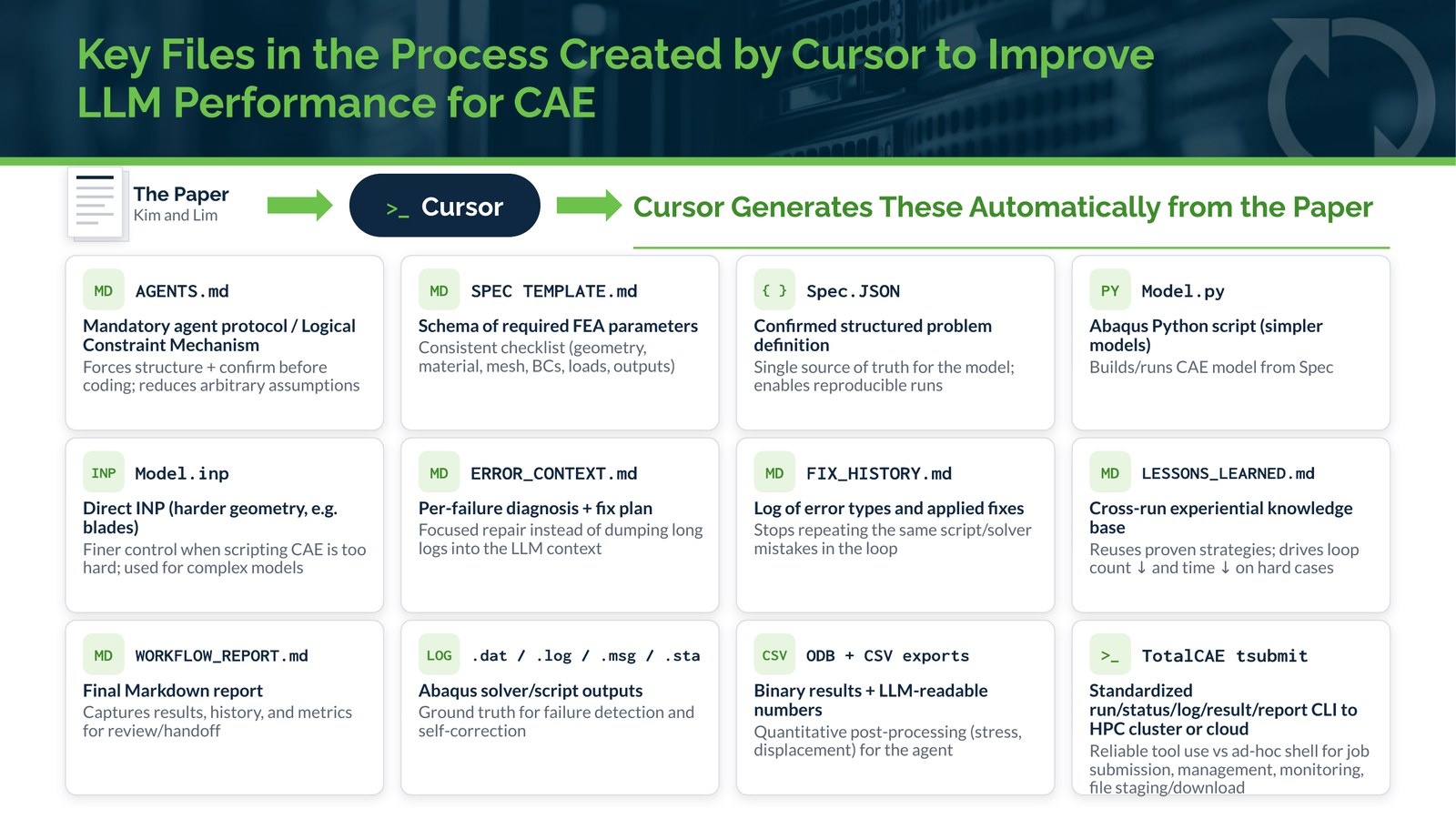
These files are what reduce hallucinations and improve robustness. They give the agent a single source of truth, a record of past mistakes, and a way to check its own work, which addresses the pitfalls that reduce productivity.
Final Agent Results and Report
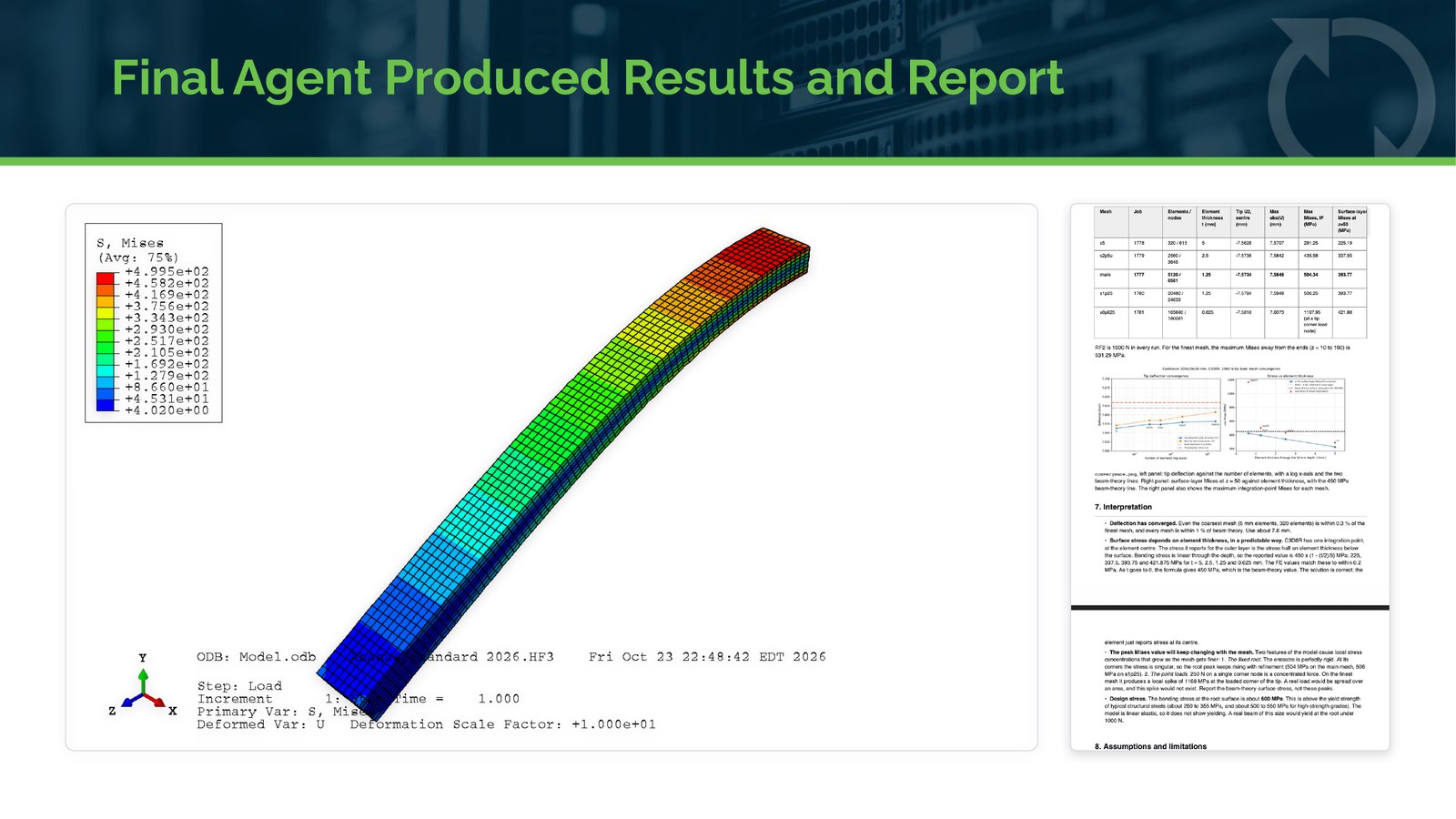
Using Cursor and the TotalCAE client tools, the framework connected to an HPC cloud cluster. It ran the analysis, drew the conclusions, and wrote up the report, all from the prompt and the framework above.
Antigravity with Gemini 3.8 Flash: Near-Identical Results
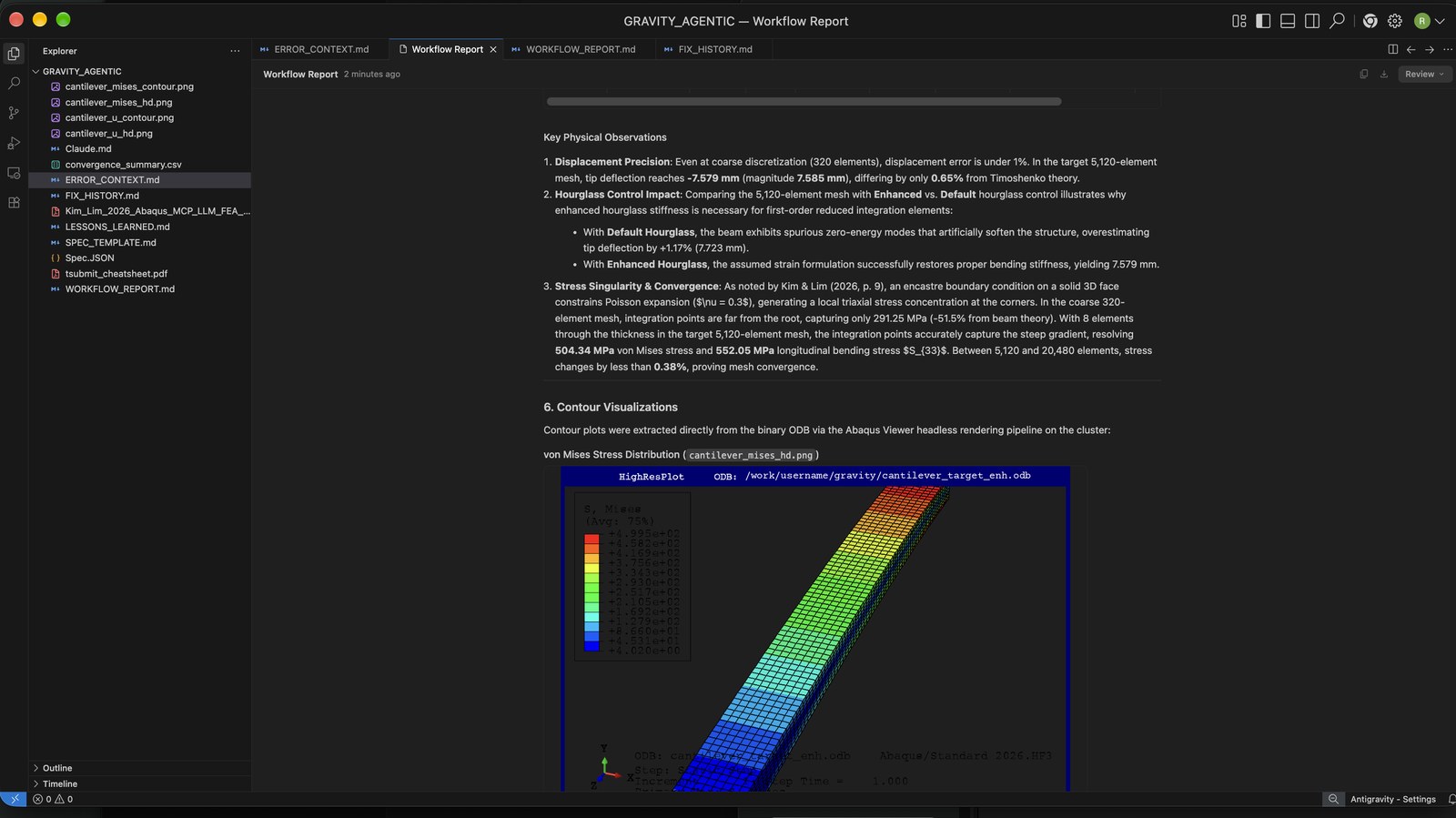
We gave the same task to Google Antigravity using Gemini 3.8 Flash, and it did equally well.
The Model Matters More Than the Tool
The different tools have pros and cons, but the tool matters less than the model used. Cursor in automatic model mode (optimized for cost) and Gemini 3.8 Flash had similar results. Modern frontier AI models are nearing parity with each other in their ability to accomplish your engineering goals, so the choice of tool often comes down to what IT has approved you to use. We cover that in Part 5.
This was a simple linear problem, but the approach can be adapted to more complicated examples, like the ones the paper delved into.
More in this series:
- Part 1: Does Using AI Really Make CAE Engineers More Productive
- Part 3: How to Use Cursor to Submit an Abaqus Run or Restart and Plot ODB Outputs
- Part 4: Using Grok Bot to Set Up and Run a Series of Load Cases, and Email, Slack or Call You When Completed
- Part 5: How to Keep Agentic AI Tools from Training on Your CAE Data
Talk to TotalCAE
Want an IT partner that can manage your HPC cluster or cloud for use by engineering, to reduce time to solution and take advantage of next level technology? Contact us at info@totalcae.com.